Monday, July 25, 2011

File and Directory Commands in Ubuntu System

cd

The cd command changes directories. When you open a terminal you will be in your home directory. To move around the file system you will use cd.
  • To navigate into the root directory, type:
    cd /

  • To navigate to your home directory, type:
    cd
    or
    cd ~


    The ~ character represents the current user's home directory. As seen above, cd ~ is equivalent to cd /home/username/. However, when running a command as root (using sudo, for example), ~ points instead to /root. When running a command with sudo, the full path to your home directory must be given.
  • To navigate up one directory level, type:
    cd ..

  • To navigate to the previous directory (or back), type:
    cd -

  • To navigate through multiple levels of directories at once, specify the full directory path that you want to go to. For example, type:
    cd /var/www
    to go directly to the /www subdirectory of /var/. As another example, type:
    cd ~/Desktop
    to move you to the Desktop subdirectory inside your home directory.

pwd

The pwd command outputs which directory you are currently located in (pwd stands for “print working directory”). For example, typing
pwd
in the Desktop directory, will show /home/username/Desktop.


ls

The ls command outputs a list of the files in the current directory. For example, typing
ls ~
will show you the files that are in your home directory.
Used with the -l options, ls outputs various other information alongside the filename, such as the current permissions on the file, and the file's owner.

cp

The cp command makes a copy of a file. For example, type:
cp foo bar
to make an exact copy of foo and name it bar. foo will be unchanged.

mv

The mv command moves a file to a different location or will rename a file. Examples are as follows:
mv foo bar
will rename the file foo to bar.
mv foo ~/Desktop
will move the file foo to your Desktop directory but will not rename it.

rm

rm is used to delete files.
rm foo
deletes the file foo from the current directory.
By default, rm will not remove directories. To remove a directory, you must use the -R option. For example,
rm -R foobar
will remove the directory foobar, and all of its contents!

mkdir

The mkdir command allows you to create directories. For example, typing:
mkdir music
will create a directory named music in the current directory.

How to Enable and Disable Usb Drive in a Windows system

Dear Friends  
     
   Got to know about enabling and disabling usb in a windows System .You can also do this by following some easy steps ...please follow these steps

 Press Windows + r  
    you will get the run Window in that type regedit, and then click OK.


u will get to see registry editor window in that navigate to the following path
HKEY_LOCAL_MACHINE\SYSTEM\CurrentControlSet\Services\UsbStor


in that u will see the Default file click on that and
In the Value data box, type 3  click OK
it will enable the USB access in your windows System

if you want to disable enter 4 click ok..  and it will disable your USB access on Windows System...


Saturday, July 23, 2011

CRM Main Modules

CRM Systems as main player in CRM(Customer Relationship Management) Industry provides basic modules generally used in the CRM industry. Such modules involves general business process in CRM. Those modules are:

Sales Module
 CRM Sales Module provides up-to-the-moment, proactive intelligence to maximize sales revenue. With  CRM Sales all levels of the selling organization can access the facts required to confidently pinpoint problems and deploy resources. CRM Sales allows managers to monitor sales pipelines and evaluate the performance of the entire sales distribution network.  CRM Sales enables sales professionals to identify critical trends in sales cycle length, win rates, discounting, and competitive engagement. This level of visibility is vital to any organization deploying a high-performing sales force.

Marketing  Module
CRM Marketing  Module provides the campaign management, customer management and marketing communications functionality. Users can design and manage outbound campaigns through direct sales, call centers, and channel partners. CRM Marketing also provides list management capabilities to develop internal lists and load external list files and prospect management with promotion of prospects to contacts.  Marketing's response management enables marketers to track customer responses and evaluate campaign effectiveness.

Service Module
CRM Service module enable customer agents interact quickly and consistently across a broad range of communication channels, such as telephone, email, fax, and page. Service representatives become productive faster, supporting a broader range of products and services, resulting in higher satisfaction levels in each customer interaction.  

Friday, July 22, 2011

Extended CRM


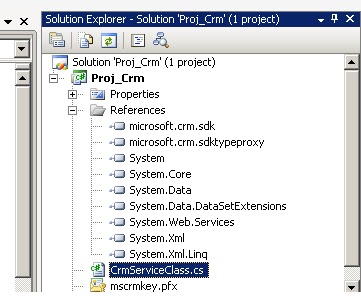
Add the Reference to our project in Visual Studio from SDK kit

Microsoft.Crm.SdkTypeProxy;
Microsoft.Crm.Sdk;

Add the follwing code means Namespaces

using Microsoft.Crm.SdkTypeProxy;
using Microsoft.Crm.Sdk;


Creating a crmservice using the c# code

class CrmServiceClass
    {
        public CrmService createcrmservice()
        {
            // Set up the CRM Service.
            CrmAuthenticationToken token = new CrmAuthenticationToken();
            token.AuthenticationType = 0;
            token.OrganizationName = "Organization Name";

            CrmService service = new CrmService();
            service.Url = "http://localhost:5555/mscrmservices/2007/crmservice.asmx";
            service.CrmAuthenticationTokenValue = token;
            service.Credentials = new System.Net.NetworkCredential("user", "password", "Domain Name");
             //The Commented line is used to get the default login details means it will take the user currently logined
            // service.Credentials = System.Net.CredentialCache.DefaultCredentials;
            return service;

        }
    }


Method used to Create a Entity in CRM 


 class createEntity
    {
        public void createentity()
        {
            CrmServiceClass obj=new CrmServiceClass();
            CrmService  service = (CrmService)obj.createcrmservice();
            // Create an account entity and assign data to some attributes.
            account newAccount = new account();
            newAccount.name = "Athul";
            newAccount.accountnumber = "123456";
            newAccount.address1_postalcode = "98052";
            newAccount.address1_city = "Redmond";

            contact newcontact = new contact();
            newcontact.firstname = "athul";
            newcontact.fullname = "Athul Mt";
            newcontact.emailaddress1 = "athulmt@gmail.com";
            // Call the Create method to create an account.
            Guid accountId = service.Create(newAccount);
            Guid conatctId = service.Create(newcontact);
        }
    }


Method to update a Entity


class updateEntity
    {
        public void updateentity()
        {
            CrmServiceClass obj = new CrmServiceClass();
            CrmService service = (CrmService)obj.createcrmservice();
            DynamicEntity dynAccount = new DynamicEntity("account");
            dynAccount.Properties.Add(CrmTypes.CreateKeyProperty("accountid", new Key(new Guid("10AA7D61-25B4-E011-B20B-000C29B9B349")))); //give the record guid within quotes
            dynAccount.Properties.Add(CrmTypes.CreateStringProperty("name", "Test Account 2"));

            TargetUpdateDynamic target = new TargetUpdateDynamic();
            target.Entity = dynAccount;

            UpdateRequest request = new UpdateRequest();
            request.Target = target;
            UpdateResponse response = (UpdateResponse)service.Execute(request);
            Console.WriteLine("record updated");
            Console.Read();
        }
    }

Monday, July 18, 2011

How to change Sql server Windows Authentication to Mixed Mode Authentication

I have installed Sql Server 2008 express edition but by mistake I kept the windows authentication mode.

Now I want to change that to SQL SERVER MIXED mode. How to do this?

Ans:-

Right click on server which you have connected
In that select Server Properties - Security - [Server Authentication section] you check Sql Server and Windows authentication mode

C#

What is an Abstract Class?

An abstract class is a special kind of class that cannot be instantiated. So the question is why we need a class that cannot be instantiated? An abstract class is only to be sub-classed (inherited from). In other words, it only allows other classes to inherit from it but cannot be instantiated. The advantage is that it enforces certain hierarchies for all the subclasses. In simple words, it is a kind of contract that forces all the subclasses to carry on the same hierarchies or standards.

What is an Interface?

An interface is not a class. It is an entity that is defined by the word Interface. An interface has no implementation; it only has the signature or in other words, just the definition of the methods without the body. As one of the similarities to Abstract class, it is a contract that is used to define hierarchies for all subclasses or it defines specific set of methods and their arguments. The main difference between them is that a class can implement more than one interface but can only inherit from one abstract class. Since C# doesn�t support multiple inheritance, interfaces are used to implement multiple inheritance.

Both Together

When we create an interface, we are basically creating a set of methods without any implementation that must be overridden by the implemented classes. The advantage is that it provides a way for a class to be a part of two classes: one from inheritance hierarchy and one from the interface.

When we create an abstract class, we are creating a base class that might have one or more completed methods but at least one or more methods are left uncompleted and declared abstract. If all the methods of an abstract class are uncompleted then it is same as an interface. The purpose of an abstract class is to provide a base class definition for how a set of derived classes will work and then allow the programmers to fill the implementation in the derived classes.

Type Casting

Converting an expression of a given type into another type is known as type-casting.

Implicit conversion

Implicit conversions do not require any operator. They are automatically performed when a value is copied to a compatible type

short a=2000;

int b;

b=a;


Explicit conversion

C++ is a strong-typed language. Many conversions, specially those that imply a different interpretation of the value, require an explicit conversion.


short a=2000;

int b;

b = (int) a; // c-like cast notation

b = int (a); // functional notation

sealed class

A sealed class cannot be inherited. It is an error to use a sealed class as a base class. Use the sealed modifier in a class declaration to prevent inheritance of the class.

sealed class MyClass

{

public int x;

public int y;

}

Wednesday, June 8, 2011

Microsoft Dynamics AX

Microsoft Dynamics AX is one of Microsoft’s enterprise resource planning software products.

History

Microsoft Dynamics AX was originally developed as a collaboration between IBM and Damgaard as IBM Axapta. IBM returned all rights in the product to Damgaard shortly after the release of Version 1.5. before Damgaard was merged with Navision Software A/S in 2000. The combined company, initially NavisionDamgaard, later Navision A/S, was then ultimately acquired by the Microsoft Corporation in the summer of 2002.[3] Before the merger, Axapta was initially released in March, 1998 in the Danish and U.S. markets. Today, it is available and supported in forty-five languages in most of the world.

Custom AX development and modification is done with its own IDE, MorphX, and resides in the same client application that a normal day-to-day user would access, thus allowing development to take place on any instance of the client. The development language used in Axapta is X++.

On May 26, 2008, Microsoft completed developing the latest version (2009) in facilities spanning the globe and including sites in Vedbæk, Denmark; Kiev, Ukraine; Fargo, North Dakota, United States; and Redmond, Washington, United States.

Architecture

The Microsoft Dynamics AX software is composed of four major components:

The Database Server, a database that stores the Microsoft Dynamics AX data
The File Server, a folder containing the Microsoft Dynamics AX application files
The Application Object Server(s) (AOS), a service that controls all aspects of Microsoft Dynamics AX's operation
The Client(s), the actual user interface into Microsoft Dynamics AX

 
MorphX and X++

MorphX is an integrated development environment in Microsoft Dynamics AX that allows developers to graphically design data types, base enumerations, tables, queries, forms, menus and reports. MorphX supports drag-and-drop and is very intuitive. It also allows access to any application classes that are available in the application, by launching the X++ code editor.

Because MorphX uses referencing to link objects together, changes in, for example, datatypes of fieldnames will automatically be reflected in all places where they are used (such as forms or reports). Furthermore, changes made through MorphX will be reflected in the application immediately after compilation.

Microsoft Dynamics AX also offers support for version control systems (VCS) integrated with the IDE, allowing collaboration in development. There is also a tool for reverse-engineering table structures and class structures to Visio. The actual implementation limits the practical use of both these features.

X++ itself is the programming language behind MorphX, and belongs to the curly brackets and .-operator class of programming languages (like C# or Java). It is an object-oriented class-based single dispatch language. X++ is a derivative of C++ (both lack the finally keyword for example) to which garbage collection and language integrated SQL queries were added.