Wednesday, August 15, 2012

Parse CRM Date with JavaScript


A JavaScript function to parse a CRM Date that returns a JavaScript Date object. This method can be used in both 2011 and 4.0


  //parsing

  function parseDate(xmlDate)
   {
     if (!/^[0-9]{4}\-[0-9]{2}\-[0-9]{2}/.test(xmlDate)) {
      throw new RangeError("xmlDate must be in ISO-8601 format YYYY-MM-DD.");
     }
    return new Date(xmlDate.substring(0,4), xmlDate.substring(5,7)-1, xmlDate.substring(8,10));
   }

  // and using

 // In CRM 4.0
 
 if(retrievedOpp.attributes["estimatedclosedate"] != null && retrievedOpp.attributes["estimatedclosedate"] != undefined){
 crmForm.all.new_estimatedclosedate.DataValue = parseDate(retrievedOpp.attributes["estimatedclosedate"].value);}

  // In CRM 2011

if(retrievedOpp.attributes["estimatedclosedate"] != null && retrievedOpp.attributes["estimatedclosedate"] != undefined){
Xrm.Page.data.entity.attributes.get('estimatedclosedate').setValue(parseDate( Xrm.Page.data.entity.attributes.get('new_closedate').getValue()));}
  

Reference :- http://crmpro.blogspot.in/2009/11/javascript-function-to-parse-xml-iso.html

Wednesday, August 1, 2012

Point the Email router server after Installing CRM 2011 server


Normally when we install CRM 2011 the setup will be asking for the Email Router at that time we could have just skipped the step... 
Later if you want to point your email router server from your application server means what we can do??
There is an option specified while we install the CRM itself it is told that we can install the email router later and we can configure the same while installing crm itself they have mentioned the way over there


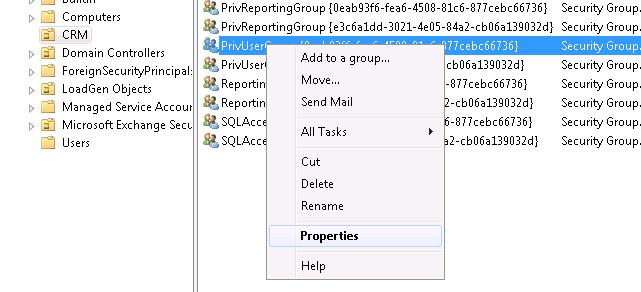
Open the Active directory 
 In you domain Navigate to CRM 
 
 Right click on the PrivUserGroup and click on properties


 It will be opening a new window in that select members tab and click on Add

 Select the object type
 Enter your router server name
 Click ok...
 

 Now its  pointed :)


 Thanks to MR Kanaga Raj Pandian and Mr Akilan S !!


Tuesday, July 24, 2012

Bing Map Integration in CRM 2011


  • First steps is to get Bingmap developers key.
  • Create an html page and use below code (Update the Key in Javascript )

<!DOCTYPE html PUBLIC "-//W3C//DTD XHTML 1.0 Transitional//EN" "http://www.w3.org/TR/xhtml1/DTD/xhtml1-transitional.dtd">
<html xmlns="http://www.w3.org/1999/xhtml" >
   <head>
      <title></title>

      <meta http-equiv="Content-Type" content="text/html;charset=utf-8"/>


      <script type="text/javascript" src="http://ecn.dev.virtualearth.net/mapcontrol/mapcontrol.ashx?v=7.0"></script>


      <script type="text/javascript">


          var map = null;


          function GetMap() {

              // Initialize the map

             map = new Microsoft.Maps.Map(document.getElementById("mapDiv"), { credentials: "AiglyGRJixW4KFbAwhKz2C6QlXbFxVfePmlKPZLmc3DapzpwEJR-mGXc9go-zk7Y", mapTypeId: Microsoft.Maps.MapTypeId.road });


          }


          function ClickGeocode(credentials) {

              map.getCredentials(MakeGeocodeRequest);

          }


          function MakeGeocodeRequest(credentials) {

            //Get City value from MS CRM account’s form

              var geocodeRequest = "http://dev.virtualearth.net/REST/v1/Locations/"+ window.parent.Xrm.Page.getAttribute('address1_city').getValue() + "?output=json&jsonp=GeocodeCallback&key=" + credentials; //make sure to replace field name if you are using custom field.

              CallRestService(geocodeRequest);

          }


          function GeocodeCallback(result) {

                   if (result &&

                   result.resourceSets &&

                   result.resourceSets.length > 0 &&

                   result.resourceSets[0].resources &&

                   result.resourceSets[0].resources.length > 0) {

                  // Set the map view using the returned bounding box

                  var bbox = result.resourceSets[0].resources[0].bbox;

                  var viewBoundaries = Microsoft.Maps.LocationRect.fromLocations(new Microsoft.Maps.Location(bbox[0], bbox[1]), new Microsoft.Maps.Location(bbox[2], bbox[3]));

                  map.setView({ bounds: viewBoundaries });


                  var location = new Microsoft.Maps.Location(result.resourceSets[0].resources[0].point.coordinates[0], result.resourceSets[0].resources[0].point.coordinates[1]);

                  var pushpin = new Microsoft.Maps.Pushpin(location);

                  map.entities.push(pushpin);

              }

          }


          function CallRestService(request) {

             var script = document.createElement("script");

              script.setAttribute("type", "text/javascript");

              script.setAttribute("src", request);

              document.body.appendChild(script);

          }


      </script>


   </head>

   <body onload="GetMap();ClickGeocode();">

      <div id='mapDiv' style="position:relative;width:400px; height:400px;"></div>

   </body>

</html>

Sunday, May 27, 2012

Retrieve the related entity Data using Javascript (json)

 In this example it will retrieve the related sales order detail for a specific sales order ..

 retirevesalesorderdetails :function () {
 var GUIDvalue = Xrm.Page.data.entity.getId();
 var serverUrl = Xrm.Page.context.getServerUrl();
 var req = new XMLHttpRequest(); req.open("GET", serverUrl +   "/XRMServices/2011/OrganizationData.svc/SalesOrderSet(guid'" + GUIDvalue + "')/order_details", true); //order_details is the relationship with the sales order and sales order details
  req.setRequestHeader("Accept", "application/json");
  req.setRequestHeader("Content-Type", "application/json; charset=utf-8");
  req.onreadystatechange = function () {
     if (this.readyState == 4 /* complete */) {
            if (this.status == 200) {
                        var returned = JSON.parse(this.responseText,_dateReviver).d;
                        successCallback(returned.results);
                         if (returned.__next != null) { }
                         else { OnComplete(); } }
                         else { errorCallback(_errorHandler(this)); }
                   }
               };
     req.send();
 }


_dateReviver: function (key, value) {
    ///


    /// Private function to convert matching string values to Date objects.
    ///

    ///

    /// The key used to identify the object property
    ///
    ///

    /// The string value representing a date
    ///
    var a;
    if (typeof value === 'string') {
        a = /Date\(([-+]?\d+)\)/.exec(value);
        if (a) {
            return new Date(parseInt(value.replace("/Date(", "").replace(")/", ""), 10));
        }
    }
    return value;
}
function errorHandler(error) {
    writeMessage(error.message);
}
function successCallback(results) {
    for (var i = 0; i <= results.length; i++) {
        var Result = results[i];
        if (Result != null) {      
            var ProductId = Result.tci_productid;
            var SalesQty = Result.quantity;
  }
 }
}

function OnComplete() {
    //OnComplete handler
}

Note :- in this you have to add the json2.js libaray also for the parsing to happen .. it is available with CRM 2011 SDK

Tuesday, April 3, 2012

Create a Web Service for your Silverlight App


Web service is a method of communication between two electronic devices over the web (internet).
The W3C defines a "Web service" as "a software system designed to support interoperable machine-to-machine interaction over a network". It has an interface described in a machine-processable format (specifically Web Services Description Language, known by the acronym WSDL). Other systems interact with the Web service in a manner prescribed by its description using SOAP messages, typically conveyed using HTTP with an XML serialization in conjunction with other Web-related standards.
Here is link shows how to create a Web service In Silverlight.


Friday, March 30, 2012

How to create a Webservice in Visual studio 2010


Click on File->New ->project
Select the Asp.NET Empty Web Application and click so it will be creating a new Web application
In that you will be able to add the web service

In solution explore Right Click on the Project and select Add New Item


In  the New window opened you will be able to find Web Service  
Select that and Click Ok.                                           


So your new web Service has been created

In the code view, you can see lot of comments and C# code already written for you. You will also see that at the bottom, there is a method HelloWorld which is written for you by default, so you can test your service and of course say hello to the world.below is the code which is generated by default...

using System;
using System.Collections.Generic;
using System.Linq;
using System.Web;
using System.Web.Services;

namespace WebApplication1
{
    ///

    /// Summary description for WebService1
    ///

    [WebService(Namespace = "http://tempuri.org/")]
    [WebServiceBinding(ConformsTo = WsiProfiles.BasicProfile1_1)]
    [System.ComponentModel.ToolboxItem(false)]
    // To allow this Web Service to be called from script, using ASP.NET AJAX, uncomment the following line.
    // [System.Web.Script.Services.ScriptService]
    public class WebService1 : System.Web.Services.WebService
    {

        [WebMethod]
        public string HelloWorld()
        {
            return "Hello World";
        }
    }
}

Wednesday, March 28, 2012

REST and SOAP

REST


REST stands for Representational State Transfer. (It is sometimes spelled "ReST".) It relies on a stateless, client-server, cacheable communications protocol -- and in virtually all cases, the HTTP protocol is used.


REST is an architecture style for designing networked applications. The idea is that, rather than using complex mechanisms such as CORBA, RPC or SOAP to connect between machines, simple HTTP is used to make calls between machines.
  • In many ways, the World Wide Web itself, based on HTTP, can be viewed as a REST-based architecture.
RESTful applications use HTTP requests to post data (create and/or update), read data (e.g., make queries), and delete data. Thus, REST uses HTTP for all four CRUD (Create/Read/Update/Delete) operations.
REST is a lightweight alternative to mechanisms like RPC (Remote Procedure Calls) and Web Services (SOAP, WSDL, et al.). Later, we will see how much more simple REST is.
  • Despite being simple, REST is fully-featured; there's basically nothing you can do in Web Services that can't be done with a RESTful architecture.
REST is not a "standard". There will never be a W3C recommendataion for REST, for example. And while there are REST programming frameworks, working with REST is so simple that you can often "roll your own" with standard library features in languages like Perl, Java, or C#.
SOAP
SOAP is a simple XML-based protocol to let applications exchange information over HTTP.
Or more simply: SOAP is a protocol for accessing a Web Service.

Why SOAP?

It is important for application development to allow Internet communication between programs.


Today's applications communicate using Remote Procedure Calls (RPC) between objects like DCOM and CORBA, but HTTP was not designed for this. RPC represents a compatibility and security problem; firewalls and proxy servers will normally block this kind of traffic.
A better way to communicate between applications is over HTTP, because HTTP is supported by all Internet browsers and servers. SOAP was created to accomplish this.
SOAP provides a way to communicate between applications running on different operating systems, with different technologies and programming languages.

  • SOAP stands for Simple Object Access Protocol
  • SOAP is a communication protocol
  • SOAP is for communication between applications
  • SOAP is a format for sending messages
  • SOAP communicates via Internet
  • SOAP is platform independent
  • SOAP is language independent
  • SOAP is based on XML
  • SOAP is simple and extensible
  • SOAP allows you to get around firewalls
  • SOAP is a W3C recommendation