Friday, September 28, 2012

How to Restrict Saving of a Record in CRM 2011

First make sure you have the 'Pass execution context as first parameter' checkbox ticked when attaching the onSave Event Handler


In the ValidateData method make sure you have a parameter defined to receive the Execution Object.

function ValidateData(ExecutionObj){
     //Place all your data validation here
     //In case data is not valid call the below method
     // The getEventArgs() method returns an object with methods to manage the Save event.
     // The preventDefault() method cancels the save operation
     ExecutionObj.getEventArgs().preventDefault();
}

Refer this link for more details ...

Tuesday, September 4, 2012

Debugging a Plugin in CRM 2011


  1. Build and register your Plugin as usual.
    Register Plugin
  2. Inside Plugin Registration Tool, you’ll find a button which says Install Profiler, Click it.

    Install Profiler
  3. Once it is done, you will find an entry for Plug-in Profiler beneath your assemblies.
  4. Now, go-to the step for which you want to debug your plugin and press the Profile button.
    Start Profiling
  5. Once done, you will see a tag (Profiled) adjacent to the step.
    Profiled
  6. Now go ahead and execute the plugin i.e. perform the steps in CRM that will trigger this plugin.
  7. If the code has any errors, then CRM will provide you a log file to download; go ahead and download the file. (see screenshot below)
    Error Log
  8. Now, inside Visual Studio, insert Breakpoints wherever you feel and use Attach to Process button and attach the code to Plugin Registration Tool exe.
    Note: Initially you will see that VS cannot find symbols so breakpoints will not be hit.
    Attach to Process
  9. Now, go back to Plugin Registration Tool and Select the Step which you profiled earlier hit Debug button.
    Debug
  10. A new Dialog-box will be presented to you, refer to the necessary files and hit Start Plug-in Execution button.
    Start Plug-in Execution
  11. Wait for a few seconds and you will start to see the following in Plug-in Traces window from Debug screen.
    Plug-in Trace
  12. Now, switch to Visual Studio and you will see that your first Breakpoint has been hit.
    Breakpoint

Wednesday, August 15, 2012

Parse CRM Date with JavaScript


A JavaScript function to parse a CRM Date that returns a JavaScript Date object. This method can be used in both 2011 and 4.0


  //parsing

  function parseDate(xmlDate)
   {
     if (!/^[0-9]{4}\-[0-9]{2}\-[0-9]{2}/.test(xmlDate)) {
      throw new RangeError("xmlDate must be in ISO-8601 format YYYY-MM-DD.");
     }
    return new Date(xmlDate.substring(0,4), xmlDate.substring(5,7)-1, xmlDate.substring(8,10));
   }

  // and using

 // In CRM 4.0
 
 if(retrievedOpp.attributes["estimatedclosedate"] != null && retrievedOpp.attributes["estimatedclosedate"] != undefined){
 crmForm.all.new_estimatedclosedate.DataValue = parseDate(retrievedOpp.attributes["estimatedclosedate"].value);}

  // In CRM 2011

if(retrievedOpp.attributes["estimatedclosedate"] != null && retrievedOpp.attributes["estimatedclosedate"] != undefined){
Xrm.Page.data.entity.attributes.get('estimatedclosedate').setValue(parseDate( Xrm.Page.data.entity.attributes.get('new_closedate').getValue()));}
  

Reference :- http://crmpro.blogspot.in/2009/11/javascript-function-to-parse-xml-iso.html

Wednesday, August 1, 2012

Point the Email router server after Installing CRM 2011 server


Normally when we install CRM 2011 the setup will be asking for the Email Router at that time we could have just skipped the step... 
Later if you want to point your email router server from your application server means what we can do??
There is an option specified while we install the CRM itself it is told that we can install the email router later and we can configure the same while installing crm itself they have mentioned the way over there


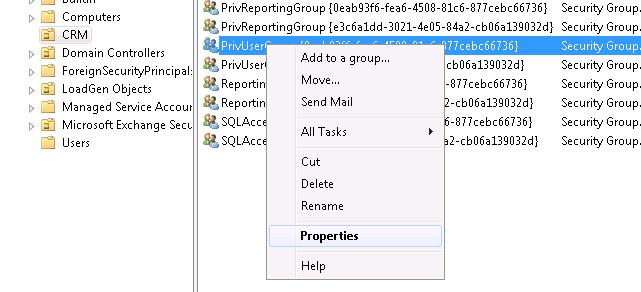
Open the Active directory 
 In you domain Navigate to CRM 
 
 Right click on the PrivUserGroup and click on properties


 It will be opening a new window in that select members tab and click on Add

 Select the object type
 Enter your router server name
 Click ok...
 

 Now its  pointed :)


 Thanks to MR Kanaga Raj Pandian and Mr Akilan S !!


Tuesday, July 24, 2012

Bing Map Integration in CRM 2011


  • First steps is to get Bingmap developers key.
  • Create an html page and use below code (Update the Key in Javascript )

<!DOCTYPE html PUBLIC "-//W3C//DTD XHTML 1.0 Transitional//EN" "http://www.w3.org/TR/xhtml1/DTD/xhtml1-transitional.dtd">
<html xmlns="http://www.w3.org/1999/xhtml" >
   <head>
      <title></title>

      <meta http-equiv="Content-Type" content="text/html;charset=utf-8"/>


      <script type="text/javascript" src="http://ecn.dev.virtualearth.net/mapcontrol/mapcontrol.ashx?v=7.0"></script>


      <script type="text/javascript">


          var map = null;


          function GetMap() {

              // Initialize the map

             map = new Microsoft.Maps.Map(document.getElementById("mapDiv"), { credentials: "AiglyGRJixW4KFbAwhKz2C6QlXbFxVfePmlKPZLmc3DapzpwEJR-mGXc9go-zk7Y", mapTypeId: Microsoft.Maps.MapTypeId.road });


          }


          function ClickGeocode(credentials) {

              map.getCredentials(MakeGeocodeRequest);

          }


          function MakeGeocodeRequest(credentials) {

            //Get City value from MS CRM account’s form

              var geocodeRequest = "http://dev.virtualearth.net/REST/v1/Locations/"+ window.parent.Xrm.Page.getAttribute('address1_city').getValue() + "?output=json&jsonp=GeocodeCallback&key=" + credentials; //make sure to replace field name if you are using custom field.

              CallRestService(geocodeRequest);

          }


          function GeocodeCallback(result) {

                   if (result &&

                   result.resourceSets &&

                   result.resourceSets.length > 0 &&

                   result.resourceSets[0].resources &&

                   result.resourceSets[0].resources.length > 0) {

                  // Set the map view using the returned bounding box

                  var bbox = result.resourceSets[0].resources[0].bbox;

                  var viewBoundaries = Microsoft.Maps.LocationRect.fromLocations(new Microsoft.Maps.Location(bbox[0], bbox[1]), new Microsoft.Maps.Location(bbox[2], bbox[3]));

                  map.setView({ bounds: viewBoundaries });


                  var location = new Microsoft.Maps.Location(result.resourceSets[0].resources[0].point.coordinates[0], result.resourceSets[0].resources[0].point.coordinates[1]);

                  var pushpin = new Microsoft.Maps.Pushpin(location);

                  map.entities.push(pushpin);

              }

          }


          function CallRestService(request) {

             var script = document.createElement("script");

              script.setAttribute("type", "text/javascript");

              script.setAttribute("src", request);

              document.body.appendChild(script);

          }


      </script>


   </head>

   <body onload="GetMap();ClickGeocode();">

      <div id='mapDiv' style="position:relative;width:400px; height:400px;"></div>

   </body>

</html>

Sunday, May 27, 2012

Retrieve the related entity Data using Javascript (json)

 In this example it will retrieve the related sales order detail for a specific sales order ..

 retirevesalesorderdetails :function () {
 var GUIDvalue = Xrm.Page.data.entity.getId();
 var serverUrl = Xrm.Page.context.getServerUrl();
 var req = new XMLHttpRequest(); req.open("GET", serverUrl +   "/XRMServices/2011/OrganizationData.svc/SalesOrderSet(guid'" + GUIDvalue + "')/order_details", true); //order_details is the relationship with the sales order and sales order details
  req.setRequestHeader("Accept", "application/json");
  req.setRequestHeader("Content-Type", "application/json; charset=utf-8");
  req.onreadystatechange = function () {
     if (this.readyState == 4 /* complete */) {
            if (this.status == 200) {
                        var returned = JSON.parse(this.responseText,_dateReviver).d;
                        successCallback(returned.results);
                         if (returned.__next != null) { }
                         else { OnComplete(); } }
                         else { errorCallback(_errorHandler(this)); }
                   }
               };
     req.send();
 }


_dateReviver: function (key, value) {
    ///


    /// Private function to convert matching string values to Date objects.
    ///

    ///

    /// The key used to identify the object property
    ///
    ///

    /// The string value representing a date
    ///
    var a;
    if (typeof value === 'string') {
        a = /Date\(([-+]?\d+)\)/.exec(value);
        if (a) {
            return new Date(parseInt(value.replace("/Date(", "").replace(")/", ""), 10));
        }
    }
    return value;
}
function errorHandler(error) {
    writeMessage(error.message);
}
function successCallback(results) {
    for (var i = 0; i <= results.length; i++) {
        var Result = results[i];
        if (Result != null) {      
            var ProductId = Result.tci_productid;
            var SalesQty = Result.quantity;
  }
 }
}

function OnComplete() {
    //OnComplete handler
}

Note :- in this you have to add the json2.js libaray also for the parsing to happen .. it is available with CRM 2011 SDK

Tuesday, April 3, 2012

Create a Web Service for your Silverlight App


Web service is a method of communication between two electronic devices over the web (internet).
The W3C defines a "Web service" as "a software system designed to support interoperable machine-to-machine interaction over a network". It has an interface described in a machine-processable format (specifically Web Services Description Language, known by the acronym WSDL). Other systems interact with the Web service in a manner prescribed by its description using SOAP messages, typically conveyed using HTTP with an XML serialization in conjunction with other Web-related standards.
Here is link shows how to create a Web service In Silverlight.